Security model overview
Applies to client 2.0.x and later. For tenant admins, auditors.
AdminExplorer is built on one principle: no user is ever a local administrator, and no standing admin account is created. Elevation is granted per program, decided on the device, and audited.
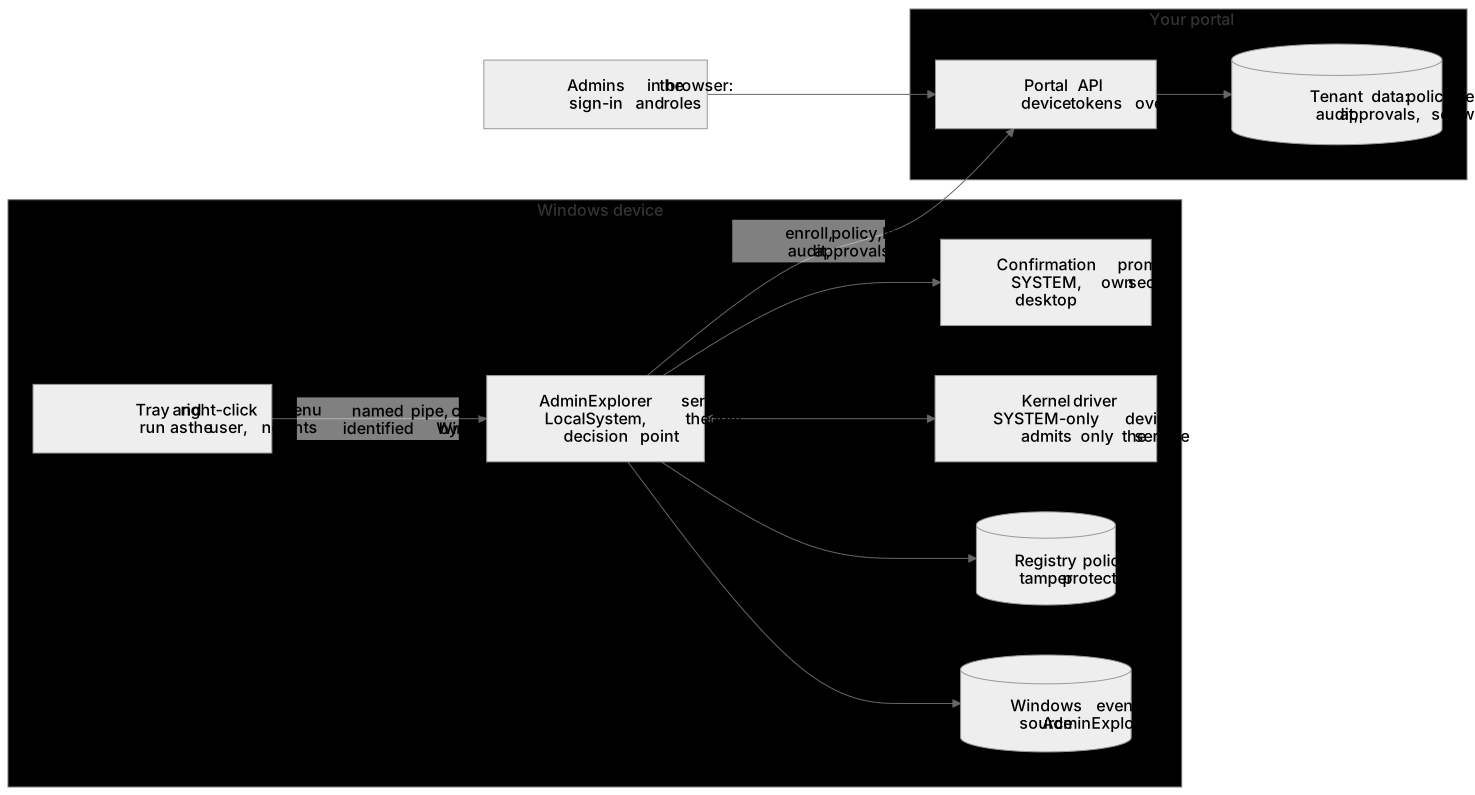
On the device
Section titled “On the device”| Component | Runs as | Does | Never |
|---|---|---|---|
| AdminExplorer service | LocalSystem | The only decision point: policy, license, portal connection, elevated token for the user, start in the user’s session, audit | Trusts what a caller says without checking it again |
| Kernel driver | Kernel | Catches starts of pre-approved programs, lets only the service create elevated tokens, governs child processes, protects the AdminExplorer registry settings against tampering | Accepts any process other than the installed service. Its device is open to SYSTEM only |
| Confirmation prompt | LocalSystem, on its own secure desktop in the user’s session | Asks the person at the keyboard to confirm an “any application” elevation | Decides anything, reads the user’s profile or clipboard |
| Tray app and right-click menu | The user | Menus, reason prompt, waiting window, messages | Opens the driver or holds elevation code |
How a request is trusted:
- The tray talks to the service over a local named pipe. The service identifies the caller from Windows (user, session, integrity), not from the request; remote clients, low-integrity and app container callers are refused.
- The file is opened once, checked on that open handle (local fixed drive, no links or junctions, no network paths) and locked against changes until the program has started.
- The elevated program runs in the user’s own session with the user’s own identity; only that program is elevated.
- Every on-demand decision can be traced: reason, match, approver, start, end and duration.
Between the device and the portal
Section titled “Between the device and the portal”- A device enrolls once with the enrollment key from your bundle and then uses its own device token (1 hour) and a rotating refresh token, stored protected on the device (readable by SYSTEM and administrators only). A revoked device stops working at its next call.
- All traffic is HTTPS (TLS 1.2 or 1.3) with server certificate validation; redirects are never followed.
- The portal never bypasses the device’s own checks: a policy or license the device considers invalid is refused as a whole, and the previous one stays.
- Licenses are signed by the portal and verified on the device; a device without a valid license elevates nothing.
- Values set by Group Policy under the AdminExplorer policy key always win over the portal.
What the portal stores
Section titled “What the portal stores”| Data | Purpose | Kept |
|---|---|---|
| Tenant, users and roles | Sign-in and access | Until removed |
| Policy | What devices may elevate | One current version per tenant |
| Devices | Hostname, machine id, last seen, reported license and policy, sandbox capability | Until revoked or the tenant is deleted |
| Audit records | Evidence of every elevation attempt | 400 days |
| Approval requests | Manual approval | 90 days |
| Installed software | Current inventory per device; change history | Inventory until the device is revoked; history 400 days |
| Entra group membership copy | Group targeting (object id, UPN, on-premises SID, group ids) | Deleted when targeting is off, disconnected or the consent is revoked |
| Download bundles | Your configured installer | Until replaced or the tenant is deleted |
| Usage snapshots | One per day per tenant: tenant id with active and enrolled device counts, seats, tier and plan; no personal data (billing history) | 400 days, also after the tenant is deleted |
| Refused enrollments | Hostname and machine id of a device refused because the seats were used up | The last 50 per tenant, 400 days, or until the tenant is deleted |
The portal stores no passwords: sign-in is through Microsoft, Google, Okta or one-time email links, and it keeps no identity provider tokens. Sessions are held in the browser’s memory with a protected refresh cookie, last at most 12 hours and end after 60 minutes without use.
The address a re-installed machine enrolled from is stored only while its re-enrollment waits for approval, at most 7 days.
Data deletion
Section titled “Data deletion”- Revoke a device: its tokens stop working and its current software inventory is deleted. Its audit records and change history remain as evidence until they expire.
- Turn off software tracking: every current inventory of the tenant is deleted at once; the change history is kept until it expires after 400 days.
- Turn off Entra group targeting: the membership copy is deleted at once.
- Delete the tenant: every record of the tenant (devices, policy, licenses, audit, approvals, software, bundles) is deleted, and users who belong only to this tenant are removed.
- Trials that are not converted are deleted 90 days after the trial license ends, unless a device still checks in.
- Uninstall the client with
msiexec /x: the settings are removed from the device (KEEPCONFIG=1keeps only the approved list and the license) and records that were not sent yet are lost.
Related guides
Section titled “Related guides”AdminExplorer documentation, published by Circle of Bytes ApS. Customers sign in at portal.adminexplorer.circleofbytes.com. Privacy